There is no best recipe app, only the one that fits the job you actually have. Paprika is the most complete. Crouton is the best built. Mela is the calmest. AnyList wins on shared shopping. ReciMe is the one that actually calculates nutrition. ReciPop is the only one that arrives with recipes already in it and plans the week for you, and also the newest here by years. Every price and feature below came from the app’s own listing and carries the date it was checked, because this category is full of roundups repeating figures that changed years ago.
One-time, sold separately per platform: $4.99 iOS, $29.99 macOS, $29.99 Windows
You type it in
Anyone who wants one database of recipes across a laptop and a phone, and would rather buy software once than subscribe.
Recipe Keeper
iOS, iPadOS, macOS, Android, Windows
Free to download, one-time Pro upgrade, $19.99 on iOS
You type it in
People who save recipes from social media and want the broadest import options.
ReciMe
iOS, iPadOS, macOS on Apple silicon, Android, web app ReciMe calls beta
$39.99 a year in the US by its own help page, opening with a 7-day free trial, though its App Store listing shows ReciMe Plus at several prices from $29.99 to $59.99. A free tier exists, limits unconfirmed
Calculated, beta
People who save most recipes from social video and want nutrition without entering it.
AnyList
iOS, Android, macOS, Apple Watch, web
Free to download. AnyList Complete is $9.99 a year individual or $14.99 household, annual only, no lifetime option
Not documented
Households sharing a shopping list more than a recipe collection.
Crouton
iPhone, iPad, macOS, Apple Watch, visionOS
Free to download. Crouton Plus is $24.99 once, and Crouton Discover is a separate $1.99 a month or $14.99 a year. They are not alternatives, they pay for different things
Not documented
Apple-household cooks who want the best-built app and will use the depth.
Mela
iPhone, iPad, macOS only
Free to download, one-time upgrade sold separately per platform: $6.99 on iOS, $14.99 on macOS
Not documented
People who want to read and cook, with the least software in the way.
Umami
iOS, iPadOS, Apple Vision, Android, web, plus a Chrome extension
Free for the first 30 days, then paid to add anything new. Price unconfirmed: the App Store listing shows two different figures for every tier, monthly, annual and lifetime
Not documented
Someone who wants one tidy app across iPhone, Android and a browser.
ReciPop
iOS first
Free to download. ReciPop Plus is $39.99 a year opening with a 7-day free trial, or $5.99 a week with no trial
Calculated, estimates
People who want the week decided for them rather than a place to file recipes they already have.
The best free recipe app
Completely free, with nothing to pay for later, there are two, and neither is in the table above because neither is bought through an app store in the usual way.
RecipeSage
Describes itself as a free, open source recipe keeper, meal planner and shopping list manager, with apps for the web, desktop, iOS and Android.
The catch: It tracks calories and macros per serving, filled in by pasting a nutrition label. We could not confirm whether it works them out from the ingredients.
Checked on 17 September 2026 against its own site.
Mealie
An open source recipe manager and meal planner under the AGPL-3.0 licence, with a recipe importer, weekly plans and shared family groups.
The catch: It is self-hosted, which means running it on a server of your own. Free in money, not in time, and not something most households will set up.
Checked on 17 September 2026 against its own site.
Everything else on this page is free to download and asks for money somewhere. AnyList caps web recipe imports at five on its free tier. Recipe Keeper, Crouton, Mela and Umami put features behind a paid upgrade. ReciMe has a free tier whose limits we could not confirm, and ReciPop is free to download with an optional Plus subscription. Paprika is the only one with no free version at all.
Our read: if paying nothing matters most, RecipeSage. If you would rather pay once and never think about it again, Paprika at $4.99 on iPhone is the cheapest paid app here.
Each one, and where it falls down
Paprika
Good at: The most complete recipe manager there is. Sync, meal planning, grocery lists that combine ingredients and sort by aisle, and a browser built into the app that clips almost anything.
Falls down: You pay again on every platform, so a phone and a laptop is two purchases, and the interface is dated.
Nutrition: A free-text field you type into yourself. Paprika’s own help documentation calls it "any nutritional information you would like to record for this recipe". Nothing is calculated.
Checked on 17 September 2026 for iOS and Mac on the App Store, 10 August 2026 for Windows against Hindsight Labs's own listing. Prices and features move.
Recipe Keeper
Good at: The widest set of ways to get a recipe in: web import, OCR scanning of photos and PDFs, pasting from text or email, and import from Instagram and TikTok.
Falls down: We could not confirm whether one Pro purchase covers every platform or each needs its own, so check the listing for your device before paying.
Nutrition: You can add nutrition information to a recipe and search by it. It is entered by you, not worked out from the ingredients.
Good at: Imports directly from Instagram, TikTok, Facebook, YouTube and Pinterest, and is the only app here we could verify actually calculates nutrition rather than asking you to type it in.
Falls down: The only yearly subscription in this list, and the nutrition feature is beta by its own description, so treat the numbers as a starting point.
Nutrition: Has a Calculate Nutrition feature producing calories, protein, carbs and fat. ReciMe’s own help pages describe it as beta and do not say how the figures are worked out.
Checked on 11 August 2026 on its help page, and 17 September 2026 on the App Store against ReciMe Pty Ltd's own listing. Prices and features move.
AnyList
Good at: The best shared grocery list here by some distance, with customisable store categories. Recipes grew out of the list rather than the other way round.
Falls down: The free tier allows only five web recipe imports, and the Mac app, web app, Watch app and meal planner all sit behind Complete.
Nutrition: Not documented anywhere in AnyList’s own materials. Treat as unknown.
Good at: Won an Apple Design Award for Interaction in 2024, and it shows. Deeply native, with a weekly planner that can build itself from your saved recipes, and AI scanning of photos, cookbooks and PDFs.
Falls down: Apple only, and the two purchases catch people out: buying Plus does not include Discover, which is where the AI import lives.
Nutrition: Not documented anywhere in Crouton’s own materials. Treat as unknown.
Good at: The calmest of them, and the best pure reading and cooking experience. It reads recipe sites cleanly, subscribes to recipe blogs by RSS, and since version 2.5 pulls recipes out of the descriptions under YouTube, TikTok and Instagram posts.
Falls down: Apple only, and both the meal planner and the grocery list are handled by Apple’s own Calendar and Reminders apps rather than built in, so there is no aisle grouping of its own. Its last iPhone update was in June 2025, the longest gap of any app on this page.
Nutrition: Not documented anywhere in Mela’s own materials. Treat as unknown.
Good at: The widest platform spread of the modern apps here, covering iPhone, Android and the web, with a tidy calendar planner and import from Instagram, TikTok and Facebook.
Falls down: We could not confirm the current price from a primary source, and while recipes you already saved stay readable without a subscription, you cannot add new ones.
Nutrition: Not documented anywhere in Umami’s own materials. Treat as unknown.
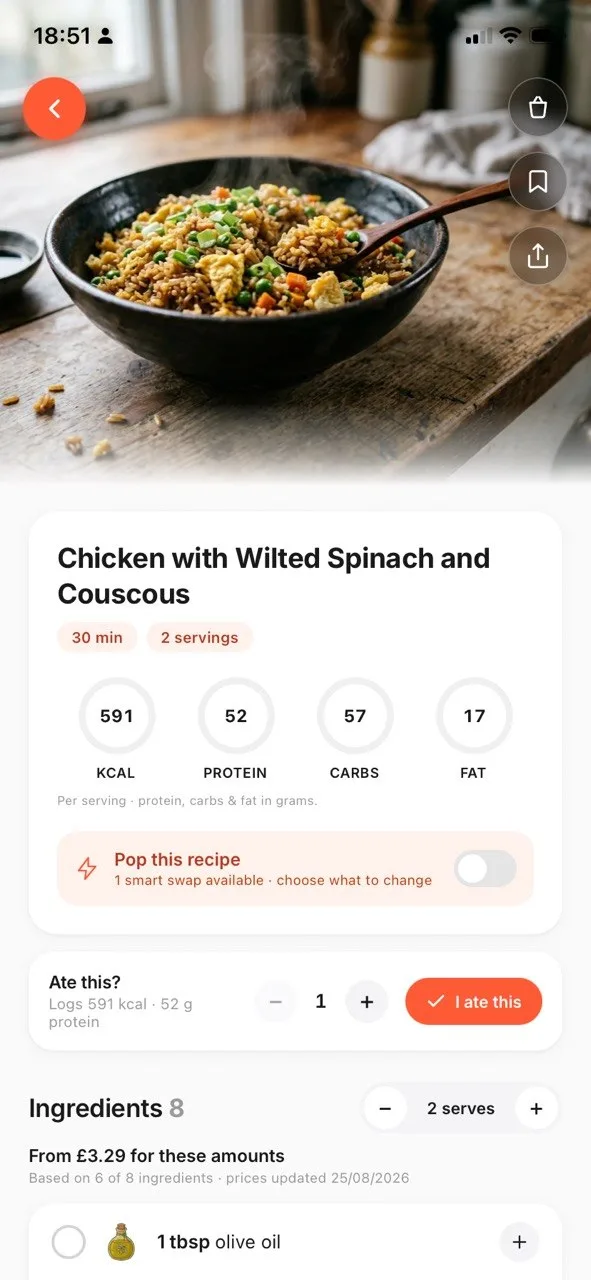
Good at: The only one here that brings its own recipes: a catalogue of more than 34,000, so a plan exists before you have saved anything. It builds the week around what you told it once, including your cook time on a weeknight, the appliances you own, your household size, allergies, dietary rules, cuisines, protein preferences, budget and which supermarket you shop at. Then it turns the week into one aisle-sorted grocery list, works out calories, protein, carbs and fat per serving, and can rewrite a recipe for more protein, fewer carbs or less fat while showing what each swap costs.
Falls down: Released on 10 September 2026, with version 1.1 following on 16 September, so it has no track record and next to no ratings where the others have years of both. It is also iOS 16.4 and up only, with no Android or web version, and no iPad or Mac app.
Nutrition: Works out calories, protein, carbs and fat per serving from the ingredient list, labelled as estimates rather than measurements.
Macros per serving
Our own app, so this is the one screen we can show you. Every other app here links to its own App Store listing, where its screenshots are.
Six sentences. One of them is probably you, and the answer falls out. Five of the six point at somebody else's app, which is the point: a recommendation you cannot trust is not worth reading.
You never want another recurring charge for a recipe app
UsePaprika
Bought once, per platform, and then it stops charging you. Nothing else here does that as cleanly, and over five years it costs less than one year of most of this list.
What ReciPop does differentlyPaprika is a filing cabinet, and a very good one, but it needs you to arrive with recipes. ReciPop brings a catalogue of more than 34,000 of its own, so there is a week to cook before you have saved anything at all.
Most of what you cook comes off social video
UseReciMe
It imports straight from Instagram, TikTok, Facebook, YouTube and Pinterest, and it is the only app here we could verify actually calculates nutrition rather than asking you to type it in.
What ReciPop does differentlyReciPop imports from a link too and works out calories, protein, carbs and fat per serving. What it adds is the step after: it will rewrite the recipe for more protein, fewer carbs or less fat, and show what each swap costs before you take it.
The shopping list matters more than the recipe collection
UseAnyList
The best shared grocery list here by some distance, with store categories you can customise. The recipes grew out of the list rather than the other way round, and it shows.
What ReciPop does differentlyAnyList gives you the better list to fill in. ReciPop's arrives already full, because it comes from a week planned around your household size, your budget and the supermarket you actually shop at, sorted by aisle in one tap.
You are an Apple household and you want the nicest software
UseCrouton
It won an Apple Design Award for Interaction in 2024 and it shows. Deeply native, with a weekly planner that can build itself from your saved recipes.
What ReciPop does differentlyCrouton's planner builds from what you have already saved, so it is only as good as your collection. ReciPop's builds from what you told it once, including how long you have to cook on a weeknight and which appliances you own.
You want as little software between you and the food as possible
UseMela
The calmest of them and the best pure reading and cooking experience. It reads recipe sites cleanly and subscribes to recipe blogs by RSS.
What ReciPop does differentlyMela hands the meal planner and the grocery list to Apple's Calendar and Reminders, so there is no aisle grouping of its own. ReciPop keeps both, and sorts the list by aisle.
You do not want to file recipes, you want to be told what is for dinner
UseReciPop
It is the only one here that arrives with its own recipes and its own opinion. You answer once about cook time, appliances, household size, allergies, dietary rules, cuisines, budget and where you shop, and it builds the week from recipes that clear all of it.
The catchIt launched on 10 September 2026, so there is no track record here and next to no ratings to read, where everything else on this page has years of both. It is iOS only, and there is no iPad, Mac, Android or web version.
What it costs to keep, not to buy
Seven of these publish a price and one does not. The interesting part is not the price, it is what happens to it: three of these apps stop charging once you have paid, and four keep going for as long as you keep cooking.
Years you keep using it
App
How it is priced
Total over 1year
PaprikaThe iOS app alone. All three platforms comes to $64.97
Bought once. No subscription of any kind
$4.99
MelaThe iOS app alone. With the Mac app, $21.98
Bought once, sold separately per platform
$6.99
Recipe Keeper
Free to download, then one Pro upgrade on iOS
$19.99
AnyListThe individual plan. Household is $14.99 a year
AnyList Complete, annual only, no lifetime option
$9.99
CroutonBoth, because Plus does not include the AI import
Plus is bought once, Discover is a separate subscription
$39.98
ReciMe
One subscription, after a 7-day trial
$39.99
ReciPopOr $5.99 a week with no trial, which comes to far more
Free to download. Plus is billed yearly after a 7-day trial
$39.99
Umami
The App Store listing shows two different figures for every tier
not published
Nothing here changes rank as you move the years, but the gaps open up fast. At one year ReciMe costs about eight times what Paprika costs on an iPhone. At five it costs forty times, because one of them stopped charging after the first payment. That is the argument for buying outright, and the honest counter is that the subscriptions are the ones still shipping features, which is what you are actually paying for.
US prices in dollars, taken from each app's own pages on the dates listed beside it above. Monthly prices are multiplied out, which is arithmetic on their figure rather than a figure they publish. Free tiers are ignored here, because this table answers what the paid version costs. Prices move, and a subscription you cancel stops costing you.
Which recipe app is the most popular?
Counted from Apple's own App Store data for the US on 25 September 2026. The number of ratings is the better signal of the two: every app here with more than a handful of ratings averages between 4.6 and 4.9 stars, so the stars barely separate them, and ReciPop's 5.0 is a single rating that means nothing yet. A large count also favours an older app, so read it as how widely used an app is, not how good.
App
Ratings, US App Store
Average
Last iPhone update
ReciMe
297,676
4.8
September 2026
AnyList
80,584
4.9
September 2026
Paprika
53,872
4.9
July 2026
Recipe Keeper
30,578
4.8
April 2026
Crouton
2,848
4.8
September 2026
Mela
870
4.6
June 2025
Umami
470
4.8
January 2026
ReciPop
1
5.0
September 2026
Two things stand out beyond the ranking. ReciMe has more ratings than the next three apps combined. And Mela had not been updated on iPhone since June 2025 when we checked, which is worth knowing before you build a collection in it. ReciPop had one rating, because it launched on 10 September 2026.
The best recipe app for iPhone, and for Android
Every app in the main comparison runs on iPhone. Crouton, Mela and ReciPop are Apple only, so they are out if anyone in the house uses Android.
On iPhone, Crouton is the best built, with an Apple Design Award to show for it, and Paprika the most complete.
On Android, the choice here is Paprika, Recipe Keeper, ReciMe, AnyList and Umami, plus RecipeSage. Paprika if you want to pay once, AnyList if a shared list matters most, and Umami for one app across Android, iPhone and the web.
Recipe manager, recipe keeper, recipe saver: the same kind of app
People search for these under at least five names: recipe manager, recipe keeper, recipe organizer, which Britain spells recipe organiser, recipe box and recipe saver. They mean the same thing, somewhere to put recipes from websites, social media and cookbooks so you can find them again and cook from them. Recipe Keeper is also the name of one app on this page, which is why "best recipe keeper app" sometimes means the category and sometimes means that app.
What none of them is, ReciPop included, is a food diary. If you want to log what you eat, that is a different kind of app.
What we could not verify
Every claim above came from the app's own site, help pages or App Store listing, and carries the date it was checked. These are the things we went looking for and could not confirm. They are listed rather than guessed, because a roundup that fills its gaps with assumptions is worse than one that admits them.
Whether AnyList, Crouton, Mela or Umami show nutrition at all. None of the four mention calories or macros anywhere in their own site, help pages or App Store listing. That is not the same as confirming they have none.
Umami’s current price. Its App Store listing shows two different figures for every tier, monthly, annual and lifetime.
Whether RecipeSage keeps any feature behind a payment. Its own site calls it free and open source, and we did not find it on the US App Store under that name.
Whether RecipeSage’s nutrition calculator works figures out from a recipe’s ingredients, or only from a nutrition label pasted in.
Crouton’s exact free-tier recipe limit, and whether its iCloud sync works before buying Plus.
Whether one Recipe Keeper Pro purchase covers every platform, or each platform needs its own.
Paprika’s pricing on Android, and whether it is a flat purchase or free with a recipe limit.
How to actually choose
Work out which of these sentences is you, and the answer falls out.
"I want all my recipes on my laptop and my phone." Paprika, or Recipe Keeper if you would rather not pay per platform. See our Recipe Keeper vs Paprika comparison for the detail.
"I save most of my recipes from Instagram or TikTok and want a rough read on the macros." ReciMe is the closest of these to that, though its nutrition feature is still in beta. Our ReciMe vs Paprika comparison covers the trade-off against paying once for Paprika instead.
"I want a modern app across iPhone, Android and the web." Umami is the newest-feeling of these, at the cost of a subscription. See our Umami vs Paprika comparison for how it stacks up against buying Paprika once.
"I do not want to pay anything, ever." RecipeSage, which calls itself free and open source. See the best free recipe app above.
"My partner and I share a shopping list." AnyList.
"I want something beautiful on my iPhone and Mac." Crouton, or Mela if you want it simpler.
"I want to know the protein without logging my food." ReciPop, free on the App Store.
"I want to track what I eat." None of these. You want a food diary, which is a different category.
Common questions
Paprika if you want the most complete manager across desktop and mobile and do not mind paying on each platform. Crouton if you are Apple-only and want the best-built one. Mela if you mostly want to read and cook. AnyList if a shared shopping list matters more than the cookbook. ReciMe if you save from Instagram and TikTok and want nutrition worked out. Umami if you need iPhone, Android and the web together. There is no single winner, because they are built for different jobs.
Almost none, and the honest answer has three parts. Paprika and Recipe Keeper both give you a field to type nutrition into yourself, confirmed in their own documentation. ReciMe does calculate calories, protein, carbs and fat, though its own help pages call the feature beta and do not say how the figures are derived. For AnyList, Crouton, Mela and Umami we found no nutrition feature documented anywhere in their own materials, which is not the same as confirming they have none. RecipeSage, the free open source option, tracks calories and macros filled in from a pasted nutrition label, and we could not confirm whether it works them out from ingredients. ReciPop estimates macros per serving from the ingredients and labels them estimates, and it is free on the App Store, though it launched on 10 September 2026 and has no reviews yet.
RecipeSage, if you want nothing to pay at all. It describes itself as free and open source, with apps for the web, desktop, iOS and Android, and it covers saving, meal planning and shopping lists. Mealie is also free and open source, but it is self-hosted, so you run it on your own server. Everything else in this comparison is free to download with limits: AnyList caps web recipe imports at five, and Recipe Keeper, Crouton, Mela and Umami each put features behind a paid upgrade. Paprika has no free tier at all.
By number of ratings on the US App Store, ReciMe, with about 298,000, well ahead of AnyList at about 81,000 and Paprika at about 54,000. Checked 25 September 2026. Ratings count how many people used an app long enough to rate it, which favours older apps, so read it as popularity rather than quality. Every app here with more than a handful of ratings averages between 4.6 and 4.9 stars.
Any app with an iOS share sheet extension can accept the link, and most of these have one. The difference is what happens next: whether you get a clean ingredient list and steps, or just a saved URL. No app can extract a recipe from a video that has no written method anywhere.
No. Paprika, Mela, Recipe Keeper and Crouton Plus are all one-time purchases. AnyList and ReciMe are subscriptions, and Umami lists lifetime tiers alongside its subscriptions. The pattern is that subscriptions attach to apps doing ongoing server-side work, such as processing an import or calculating nutrition, while a one-time purchase usually means the app runs on your own device and syncs through iCloud. Watch for per-platform pricing: Paprika and Mela both charge again for the Mac version.
Pricing and platform details change. Rechecked 17 September 2026, and worth confirming on each app's own page before buying. Related:ingredient swaps with the macros worked out.