Six apps that decide what you are cooking this week, and what each one actually asks you before it decides. Mealime has the best free tier. Eat This Much is the one to use if you are planning against a calorie target. Plan to Eat is best if you already have recipes you love. Samsung Food has by far the most recipes. Every price below came from the app’s own pages and carries the date it was checked.
Every one of these will build you a week. They differ enormously in how much they know about you first, and nobody publishes this comparison, so here it is. A tick means the app documents it in its own materials. A blank means we could not confirm it, which is not the same as the app not doing it.
Personalises on
Mealime
Plan to Eat
Cozi
eMeals
Samsung Food
Eat This Much
ReciPop
Dietary rules
✓
✓
✓
✓
Allergies
✓
✓
✓
Household size
✓
✓
✓
Cook time you have
✓
✓
✓
Appliances you own
✓
✓
Budget
✓
✓
✓
✓
Where you shop
✓
✓
✓
✓
Cuisine preference
✓
✓
Calorie or macro target
✓
✓
✓
Checked against each app’s own site, help pages and store listing on 30 August 2026, with prices rechecked on 25 September 2026.
Each one, and where it falls down
Mealime
Best at: The strongest free tier here, and the quickest route from opening an app to a 30-minute dinner with the shopping list done.
Falls down: Mobile only, and it will not plan around recipes you already have, because there is no way to bring your own in.
Price: Free tier, with a Pro subscription. Mealime documents Pro as a monthly subscription but does not publish the figure on its own pages
Recipes: Its own catalogue. Pro opens the full collection; the size is not published
Nutrition: Calculated by Mealime for its own recipes. Pro shows calories, macronutrients and micronutrients for every recipe.
Platforms: iOS and Android. No web or desktop app
Checked on 30 August 2026, prices rechecked 25 September 2026 against its own pages. Prices and features move.
Plan to Eat
Best at: Planning around the recipes you already cook, rather than someone else’s catalogue. The clipper is the best in this group.
Falls down: You start with an empty app. If you have not already collected recipes, there is nothing to plan with on day one.
Price: $5.95 a month or $49 a year, or $54.99 a year if you subscribe through Apple. 14-day trial, no card needed
Recipes: Yours only. You clip them from any site with its Recipe Clipper, or type them in
Nutrition: Calculated automatically from the ingredient list when you ask it to, and it updates when the ingredients change.
Platforms: iPhone, iPad, Android and the web
Checked on 30 August 2026, prices rechecked 25 September 2026 against its own pages. Prices and features move.
Cozi
Best at: Households, because the meal plan sits inside a shared family calendar and shopping list that everyone already uses.
Falls down: It is a family organiser that happens to plan meals, so the food side is thinner than anything else here.
Price: Free tier, Gold $39 a year, Max $79 a year. No monthly price is published
Recipes: Both. Your own recipe box, plus curated Cozi Picks. Max adds an AI planner
Nutrition: Not documented anywhere in Cozi’s own materials. Treat as unknown.
Platforms: Web, iOS and Android
Checked on 30 August 2026, prices rechecked 25 September 2026 against its own pages. Prices and features move.
eMeals
Best at: Handing the whole decision over. You pick a plan style and it arrives weekly, and it orders the shopping from Walmart, Kroger, Instacart and others.
Falls down: You choose a plan category rather than your own constraints, and each meal of the day is a separate paid add-on.
Price: About $4.99 a month on a 12-month plan, or $35.99 for three months. Meal-time add-ons cost extra. 14-day trial
Recipes: Its own catalogue, written by in-house dietitians, and you can add your own
Nutrition: eMeals publishes nutrition for all its meals. It writes the recipes itself, so the figures are its own rather than yours to enter.
Platforms: iOS, Android and the web
Checked on 30 August 2026, prices rechecked 25 September 2026 against its own pages. Prices and features move.
Samsung Food
Best at: Sheer breadth. The largest recipe library of any app on this page, on every platform, with grocery delivery in several regions.
Falls down: What it actually personalises on is described as health goals and little more, so the plan is less constrained by your kitchen than by your calorie target.
Price: $6.99 a month or $59.99 a year for Food+, after a 7-day trial. There is a free tier
Recipes: Both, and the biggest catalogue here by a distance: more than 180,000, plus anything you save from the web
Nutrition: Nutrition is shown across the catalogue, and Food+ adds tracking against a goal. Whether the figures are calculated or supplied with the recipe is not documented.
Platforms: iOS, Android and the web
Checked on 30 August 2026, prices rechecked 25 September 2026 against its own pages. Prices and features move.
Eat This Much
Best at: Hitting a number. If you have a calorie or macro target and want the plan built backwards from it, nothing else here comes close.
Falls down: The free tier plans a day at a time; planning a whole week is a paid feature. It aims at the target more than at whether you want to eat the result.
Price: Free tier. Premium is $5.00 a month billed annually; the annual total is not published on the pricing page
Recipes: Built around foods and recipes you and the community add, plus barcode scanning
Nutrition: The centre of the product. It works out a calorie and macro target from your goal, then generates plans that hit it.
Platforms: iOS, Android and the web
Checked on 30 August 2026, prices rechecked 25 September 2026 against its own pages. Prices and features move.
ReciPop
Best at: Planning around the kitchen you actually have. It asks once about cook time, appliances, household size, allergies, dietary rules, cuisines, protein preferences, budget and where you shop, then builds the week from recipes that clear all of it.
Falls down: Released 10 September 2026, so there is no track record and next to no ratings yet where everything else here has years of both. iOS 16.4 and up only, with no Android or web version.
Price: Free to download. ReciPop Plus is $39.99 a year opening with a 7-day free trial, or $5.99 a week with no trial
Recipes: Its own catalogue of more than 34,000, plus anything you save from a link
Nutrition: Worked out per serving from the ingredient list and labelled as estimates rather than measurements.
Platforms: iOS first. No Android or web version
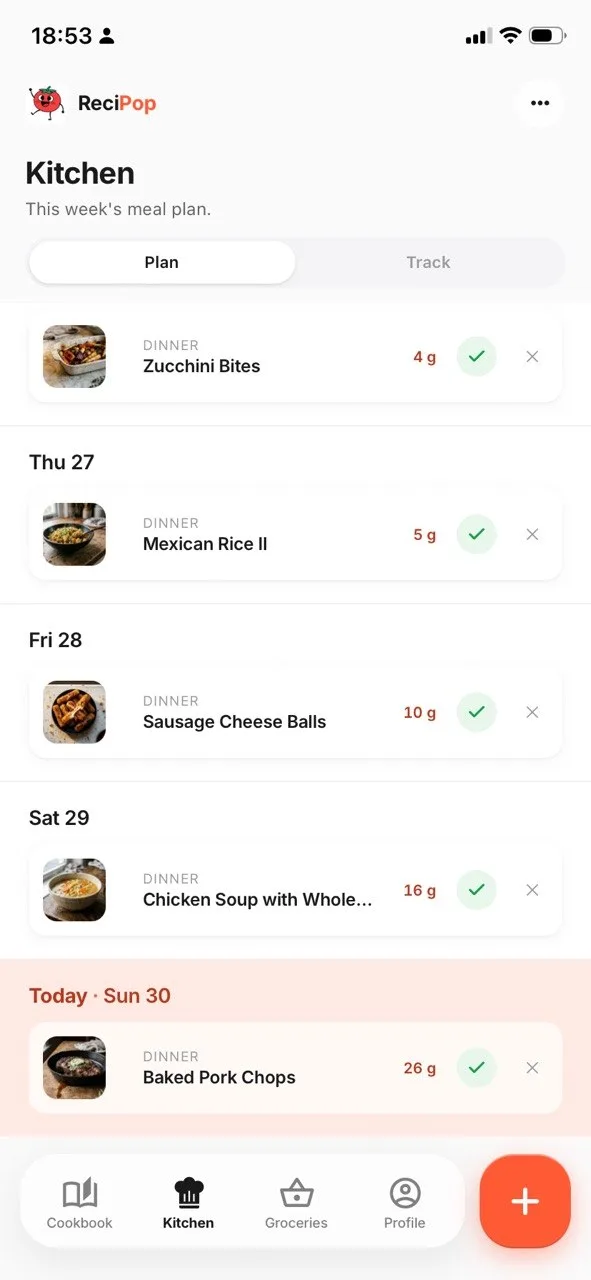
This week's plan
Our own app, so this is the one screen we can show you. Every other app here links to its own pages, where its screenshots are.
Checked on 10 September 2026 against its own pages. Prices and features move.
Which one is actually for you
Six sentences. One of them is probably you, and the answer falls out. Five of the six point at somebody else's app, which is the point: a recommendation you cannot trust is not worth reading.
You want a plan and a shopping list without paying for one
UseMealime
The strongest free tier here, and the quickest route from opening an app to a 30-minute dinner with the shopping list already done.
What ReciPop does differentlyMealime will not plan around recipes you already have, because there is no way to bring your own in. ReciPop takes a link and plans around what comes back, alongside its own catalogue of more than 34,000.
You have a calorie or macro number and the food has to fit it
UseEat This Much
This is the centre of the product rather than a feature bolted on. It works out the target from your goal and builds the plan backwards from it, and nothing else here comes close.
What ReciPop does differentlyBy its own description it aims at the target more than at whether you want to eat the result. ReciPop works the other way round: it plans food you said you liked, then shows what each swap would cost you in protein, carbs and fat so the trade is yours to make.
You have collected recipes for years and want to plan around those
UsePlan to Eat
Built for exactly this. Its Recipe Clipper is the best in this group, and the whole app assumes the recipes are yours rather than somebody else’s catalogue.
What ReciPop does differentlyYou start Plan to Eat with an empty app, so on day one there is nothing to plan with. ReciPop imports yours too and has more than 34,000 of its own for the nights when nothing in your collection fits.
The plan is no use unless everyone in the house can see it
UseCozi
The meal plan sits inside a shared family calendar and shopping list that the household already uses, which is a much lower bar to clear than getting everyone onto a new app.
What ReciPop does differentlyCozi is a family organiser that happens to plan meals, so the food side is thinner than anything else on this page. ReciPop asks how many people you are feeding and portions both the week and the grocery list for it.
You want the biggest possible library to pick from
UseSamsung Food
More than 180,000 recipes, by a distance the largest here, on every platform, with grocery delivery in several regions.
What ReciPop does differentlyReciPop's catalogue is a fifth of that size and does not try to compete on breadth. It filters rather than offers: allergies, dietary rules, the appliances you own and the time you have on a weeknight, so what you get is a week rather than a search box.
You want the week decided around your actual kitchen, not a plan style
UseReciPop
You answer once about cook time, appliances, household size, allergies, dietary rules, cuisines, protein preferences, budget and where you shop, and it builds the week from recipes that clear all of it. eMeals hands over the decision too, but you pick a plan category rather than your own constraints.
The catchIt launched on 10 September 2026. There is no track record and next to no ratings yet, where everything else here has years of both, and it is iOS only with no Android or web version.
What it costs to keep, not to buy
Not one app in this category can be bought outright. Every paid tier here is a subscription, which changes the question from what it costs to what it costs for as long as you keep cooking.
Years you keep using it
App
How it is priced
Total over 1year
CoziMax is $79 a year. There is a free tier
Gold, billed yearly. No monthly price is published
$39
ReciPopOr $5.99 a week with no trial, which comes to far more
Free to download. Plus is billed yearly after a 7-day trial
$39.99
Plan to EatOr $5.95 a month, which comes to more over a year
Billed yearly, direct. Through Apple it is $54.99
$49
eMealsMeal-time add-ons cost extra on top of this
About $4.99 a month on a 12-month plan, multiplied out
$59.88
Samsung FoodOr $6.99 a month. There is a free tier
Food+, billed yearly, after a 7-day trial
$59.99
Eat This MuchThey do not publish the annual total. There is a free tier
Premium at $5.00 a month billed annually, multiplied out
$60
Mealime
Pro exists, but Mealime does not publish the figure on its own pages
not published
Five years of the cheapest paid option here is $195, and of the dearest, $300. That is a narrow spread by the standards of this market, which means price is close to the worst way to choose between them. Three of these have a free tier, and for a household that just wants the week decided and a list at the end of it, the free tier may be the whole answer.
US prices in dollars, taken from each app's own pages on the dates listed beside it above. Monthly prices are multiplied out, which is arithmetic on their figure rather than a figure they publish. Free tiers are ignored here, because this table answers what the paid version costs. Prices move, and a subscription you cancel stops costing you.
What we could not verify
Listed rather than guessed. A comparison that fills its gaps with assumptions is worse than one that admits them, and several of these gaps are ones every other roundup quietly fills with a number from somewhere else.
Mealime’s actual Pro price. Its own support pages confirm Pro is a monthly subscription but never state the figure.
Whether Cozi shows nutrition anywhere. Nothing in its own materials mentions calories or macros either way.
Whether eMeals calculates its nutrition figures or its dietitians enter them. It writes the recipes, so the numbers are its own, but the mechanism is not stated.
Whether Samsung Food computes nutrition or takes it from the recipe source.
Eat This Much’s annual total and its month-to-month rate. Only the $5.00 a month billed annually figure appears on the pricing page.
Everything left blank in the table above. A blank means the app does not document it, which is not the same as the app not doing it.
Common questions
Mealime, if you want a plan without paying. Its free tier builds meal plans and grocery lists, with roughly a quarter of recipes reserved for Pro. Eat This Much and Cozi also have free tiers, but Eat This Much only plans a day at a time unless you pay, and Cozi is a family calendar first. Plan to Eat and eMeals have trials rather than free tiers.
It can write one, and it is genuinely good at the writing. What it cannot do is check that the plan fits the time you have on a Wednesday, keep the totals honest across seven days, turn it into a grocery list you can shop from, or remember what you already own. A general model produces plausible plans; a planner produces one you can actually shop and cook. Use it to get ideas, not to run your week.
Eat This Much, on the evidence. It works out a calorie and macro target from your goal and builds the plan backwards from that number, which is the mechanism weight loss actually needs. Mealime shows macros on its Pro tier and has calorie filters. Be wary of any app that promises weight loss without letting you set a target at all.
Mealime, Plan to Eat, Cozi, eMeals, Samsung Food and Eat This Much all run on Android. Samsung Food, Plan to Eat, eMeals and Eat This Much also work in a browser, which matters if you plan on a laptop and shop on a phone. ReciPop is iOS only today.
All of them, and the difference is what happens next. Plan to Eat and Mealime sort the list so it matches the way a shop is laid out. eMeals, Samsung Food and Eat This Much hand the list to a retailer for delivery or pickup, which saves the trip entirely.
That is a different question from this page, because a recipe organiser files recipes you already have and a meal planner decides what you are cooking. If filing is what you need, Paprika, Crouton and Mela are the ones to look at, and we compare them separately in our recipe manager roundup.